AndroXplorer Pro File Manager 4.6.1.5 apk
REQUIRES ANDROID:2.1 and up
Overview:File Manager with strong security, data compression and root support
REQUIRES ANDROID:2.1 and up
Overview:File Manager with strong security, data compression and root support
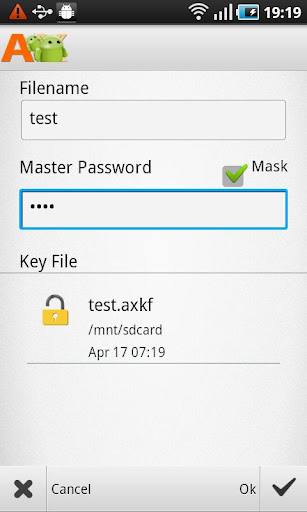
An intuitive, extremely user friendly, features-rich and sophisticated, AndroXplorer Pro is the full version of AndroXplorer. AndroXplorer Pro has built-in root explorer, supports seamless integration of encryption technology into a wide variety of archive formats, supports password database file, import and export to third party password manager such as KeePass 2, kdbx.
AndroXplorer
Pro supports a wide ranging of archive formats. For compression and
extraction, AndroXplorer Pro supports Zip, 7Z, GZIP, TAR, BZIP2, XZ,
WIM. For extraction only, AndroXplorer Pro supports LZH**, ARJ, CAB,
CHM, CPIO, CramFS, DEB, DMG, FAT, HFS, ISO, LZMA, MBR, MSI, NSIS,
NTFS*, RAR, RPM, SquashFS, UDF, VHD, WIM, XAR, Z
*Note: NTFS quoted here is the NTFS archive not the NT File System used in SD Card.
*Note: NTFS quoted here is the NTFS archive not the NT File System used in SD Card.
Options
available for Zip encoding are Deflate, Deflate64, LZMA, PPMd and
BZip2 while the variety of encoding choices for 7z are LZMA, LZMA2,
PPMd and BZip2.
AndroXplorer Pro
v. 4 has been rigorously tested on large archive and also on archive
with a lot of items. We have tested archive with up to around 100k of
items without any issue, but the end result might vary from device to
device, it depends on the memory capacity of each device and some other
factors.
AndroXplorer Pro also supports Unicode in Zip.
AndroXplorer Pro also supports Unicode in Zip.
For Q&A and our reply to your comments please visit our forum at http://bit.ly/axresponse
The following list highlights many features of AndroXplorer Pro.
•
Three fully independent views to manage, sort or display files and
folders. Each view is powered by advanced media cached system that
enables it to display the thumbnails, size, date, name of files and
folders instantly. Four display modes available for each view along
with four sorting options. Smooth and easy transition from view to view
by flicking or dragging the view left or right.
•
Each view in AndroXplorer Pro has list of the parent folders, sorting
list and selection bar that will appear once a selection has been made.
•
To manage your installed applications, AndroXplorer provides My
Programs. This feature aggregates all installed applications within a
single folder. Tap on an application within the folder to activate, to
see the properties or to get more information from the market. Options
also available to uninstall and performing backup where it is
applicable.
• Shortcuts feature in
AndroXplorer Pro is very easy to use, it enables you to create
shortcuts to files and folders from any folder within a view. The
shortcuts are then saved in a folder for future references. In the
phone, add-shortcut command is available at the additional sub-menu on
the right-bottom of the screen.
•
AndroXplorer Pro also has built-in fast file search based on simple
pattern or Regular Expression. Searching under AndroXplorer Pro v. 4 is
very fast and responsive due to the new implementation of advanced
search module.
• Reliable WiFi
network file sharing supporting SMB servers with auto scan function
that can be started and stopped with a touch of the refresh button.
• Instant display of thumbnails of media file and other Mime type after caching. Media file display requires the support of the media and also at least the device must be running Froyo.
• Six high resolution themes to suit your mood.
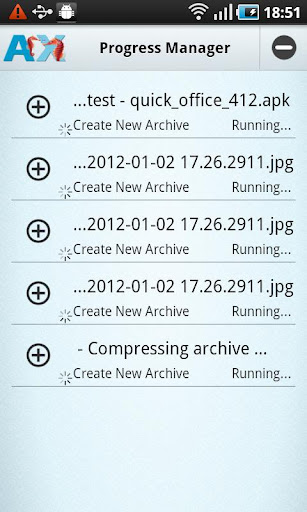
• Progress manager to manage multiple file operations concurrently. AndroXplorer Pro v.4 supports multitasking but if you are not using a fast device, you might want to consider using fewer tasks simultaneously for better responsiveness.
• Root support for users with rooted device.
• Recycle bin for files in SD Card
• Backup and Restore shortcuts and servers information
• Collapsible dashboard and Breadcrumbs dashboard items for tablet
• Instant display of thumbnails of media file and other Mime type after caching. Media file display requires the support of the media and also at least the device must be running Froyo.
• Six high resolution themes to suit your mood.
• Progress manager to manage multiple file operations concurrently. AndroXplorer Pro v.4 supports multitasking but if you are not using a fast device, you might want to consider using fewer tasks simultaneously for better responsiveness.
• Root support for users with rooted device.
• Recycle bin for files in SD Card
• Backup and Restore shortcuts and servers information
• Collapsible dashboard and Breadcrumbs dashboard items for tablet
AndroXplorer Pro File Manager 4.6.1.5
What’s in this version:
[+] Built-in text editor can now detect International character encoding
version 4.6.0.6
[+] Multiple Volume RAR archive extraction support
[+] Create and extract Multiple Volume 7z archive
Note:
In a very rare occurrence, usually immediate after placing your purchase, you might receive incorrect “not license” message due to the Play store cache issue. Our FAQ provides steps to resolve this issue and the explanation on why it might happen:
http://goo.gl/wwqCTversion 4.6.0.6
[+] Multiple Volume RAR archive extraction support
[+] Create and extract Multiple Volume 7z archive
Note:
In a very rare occurrence, usually immediate after placing your purchase, you might receive incorrect “not license” message due to the Play store cache issue. Our FAQ provides steps to resolve this issue and the explanation on why it might happen:
AndroXplorer Pro File Manager 4.6.1.5 apk


0 comments:
Post a Comment