Showing posts with label widget. Show all posts

Saturday, 2 November 2013

Pure Calendar widget [agenda] v3.2.5 apk download

Pure Calendar widget (agenda) v3.2.5
Requirements: 1.5 and up
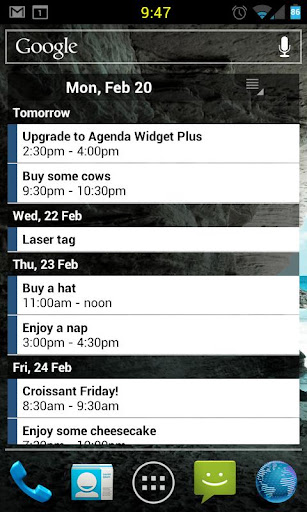
Overview: Widget for Agenda / Tasks / TODO (agenda style)
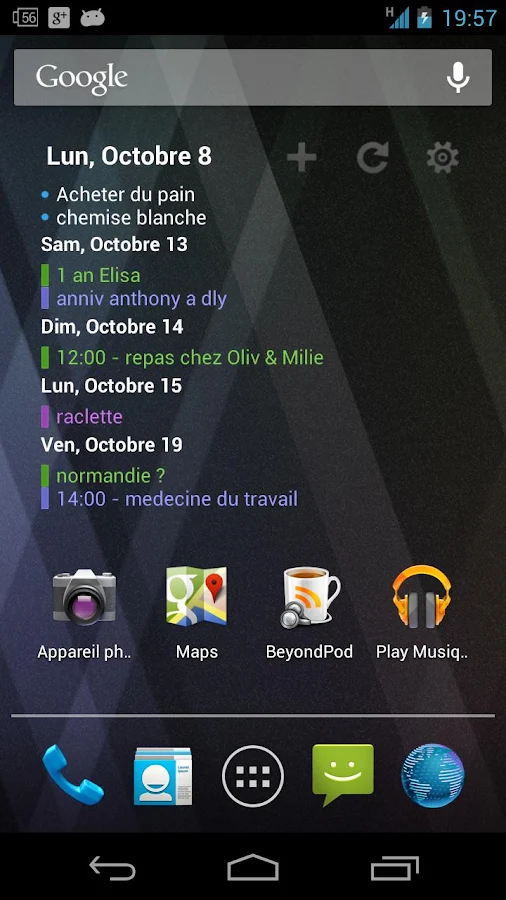

- Synced with Google calendars
- Show calendars from Google, TouchDown & Moto/LG Exchange
- Show tasks from Astrid, MyPhoneExplorer, Ultimate To-Do List, TaskSync, CalenGoo, DGT Gtd, gTasks, Got To Do, Task Organizer, Due Today, TouchDown, Pocket Informant
- Show birthdays from contact book with plugin (no 'read contacts' permissions required in the main app)
- Can add bi-weekly / bi-monthly events (or more complex)
- Multiples skins (including fully transparent) and widgets sizes to make a fancy widget
- Scrollable widgets with Android 3.x/4.x and with most alternative launchers like ADW, LiveHome, Go Launcher Ex or LauncherPro
- Support Android 4.0 and 4.1 (ICS / Ice cream Sandwich / Jelly Bean)
- Support Home timezone for travels

What's New
3.2.5:
- NEW support Google calendar individual event colors
- FIX due date display for task when inline
- FIX issue with task manager switch
- FIX Detect TouchDown database lock

This app has NO advertisements

More Info:
Code: 

Wednesday, 13 February 2013

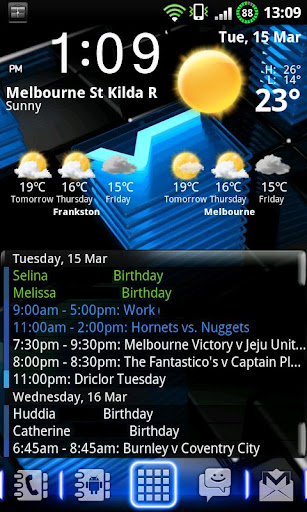
Animated Weather Widget&Clock apk v5.5.1 download

Animated Weather Widget&Clock v5.5.1
Requirements: 1.6 and up
Overview: Animated Weather forecast: realistic video effects, detailed world data.
Pro – No ads, Full forecast.
Unistall Free and Install Pro version.
Digital Clock widget 4×2 with Weather forecast application. The exquisitely realistic video effects of cloudiness, rain and snow provide the vivid sensation of current or future weather conditions for more than 50000 locations over the world.
Different size widgets with a clock and a forecast for the selected day.
– Desktop widgets with digital clock
– Animated daily weather forecast
– Realistic Video effects of cloudiness, rain and snow
– Multiple scene landacapes
– Custom (user-defined) backgrounds
– Global world weather
– 50000+ locations worldwide
– Auto update forecast
– Data in Metric/Imperial
– Geolocation (GPS Search)
Features in Development
– Animated widget
– Live wallpapers
– Multiple locations / cities
– Weather for GPS location
– Improve video effects
– Local weather providers
– Skins
What’s in this version:
+ Icon on widget (иконки текущей погоды подстраиваются по восходу закату)
+ Pos in Navigator (при открытии до восхода утро, до заката день, до 9 вечер потом ночь)
+ Valentine (14 будет крутая луна)
– Error with enmpty data
This app has NO advertisements
More Info:
Code:
 

Monday, 11 February 2013

Holo Widgets apk v1.0.3 download

 
\"\"
Holo Widgets v1.0.3
Requirements: 4.0 and up
Overview: Holo Widgets is a set of… widgets!
\"\"
They are designed to perfectly integrate with stock Android Holo style.
→ Included widgets ←
✓ Battery
✓ Call log
✓ Contacts
Facebook notifications
✓ Sms
✓ ToDo
Features:
✓ Using Android Holo theme
✓ Ready for smartphones and tablets
✓ Fully resizable
✓ Multiple screen resolutions support
This app has no advertisements
Free Holo Widgets v1.0.3 apk
 

Friday, 8 February 2013

Premium Widgets & Weather apk v1.3.5 download

Premium Widgets & Weather v1.3.5
Requirements: 2.2 and up
Overview: Fantastic Widgets in HD, with clock & weather + professional weather App with 4-day hourly forecast, detailed info and HD weather animations. The most beautiful widgets + weather app for Android!
Choose between 6 different Widgets, each skinnable with 10 different themes. Widgets include Digital Clock, special effects like rain drops or clouds, and weather forecast.
With just a touch the app enters "full screen mode" with beautiful weather HD animations and detailed forecast. Other features include detailed weather info, location-aware weather, weather by city name, and more.
Widgets include:
– 3 Different Premium Clocks with weather
– Homescreen widget with clock, weather, hourly forecast, 3-day forecast.
– Small Clock + weather
– Special effects (rain drops, sunshine, clouds)
– Each widget supports 10 different skins!
Main Weather App include:
– "Today" advanced weather data (pressure, humidity, visibility, cloud cover, precipitation)
– 4-day hourly weather forecasts (morning, mid-day, evening, night)
– Today Sunrise/Sunset time
– Full Screen Weather animations (night & day)
– data by World Weather Online
– Works with city name or GPS
Premium Widgets is the fastest growing weather app, with over 20 updates released in a few month. We are working hard to make it always better, we want it to be the best!
What’s in this version:
– Fixed update bug
This app has NO advertisements
More Info:
Code
 

Saturday, 2 February 2013

HD Widgets apk v3.8.2 download

HD Widgets v3.8.2
Requirements: 2.2 and up
Overview: HD Widgets does two things: gives you great looking widget and makes it fun and easy to customize them.
The app includes a dozen colorful, widgets including special tablet-sized widgets for 7" & 10" Honeycomb tablets. Most display time and weather while the larger ones include your choice of 5-day forecast or utility switches.
The best part of HD Widgets is how fun and easy it is to use. Everything in the app is swipe-able: the menu, the pages, and the options. You just swipe left and right to change details on the fly. You can mix and match 30 different clocks (LED, flip clock, and Honeycomb) with backgrounds, layouts, and options. Simple!
App Features
– fullscreen tablet app
– fun & unique "slidey-nav" UI
– quick and easy editing
– visual configuration
– page swiping, menu swiping, option swiping
– Fullscreen weather activity
HD weather icons
– quick tips to help you get started
Widget Features
– lots of beautiful widgets
clock, date, location, weather, forecast, & utility switches
LED, Flip Clock, & Honeycomb clock designs
– over a dozen backgrounds
– large made-for-tablet widgets
– 100s of configurations
– hot spots for alarm clock, calendar, & weather
Options
– choice of AccuWeather or WeatherBug service
– 12 / 24 hr clock
– F / C temperature
What’s in this version:
3.8.1 – 3.8.2
– bug fixes
This app has no advertisements
More Info:
Code:
 

Friday, 1 February 2013

Recast Weather and Widgets apk v1.0.10 download

Recast Weather and Widgets v1.0.10
Requirements: 2.2 and up, Rooted
Overview: Recast is the best way to customize weather and widgets on your Android device.
On phone, tablet or Google TV, Recast is the best way to customize weather, widgets and control your Android device.
Easily change and personalize nearly everything: colors, icons, fonts, layouts, sizes and more!
Uses modern Ice Cream Sandwich Holo interface look, no matter what Android OS you have and works on nearly every Android device!
The online catalog makes it easy and fast to get new widgets, colors, styles and more.
Add as many locations as you want and customize each one for C/F, metric/imperial, 12/24 hour, naming and more.
Offers the most popular widget sizes: 1×1, 1×4, 2×2, 3×2, 4×1, 4×2, 5×1, 5×2 and full screen portrait and landscape views.
Very resource friendly and doesn’t use your network or battery while your screen is off.
GPS and automatic weather updates can be disabled for full manual control.
Recast is weather and widgets done your way.
For questions, suggestions or help visit us at Recast widgets and weather for Android
– Supports Android OS 2.2 Froyo, 2.3 Gingerbread and 3.x Honeycomb, 4.0 Ice Cream Sandwich and 4.1 Jelly Bean
– One app works on virtually all phones, notes, media players, tablets and Google TVs
– Attractive and clean widgets with clocks, dates, weather, battery, toggles and more
– Change nearly everything: backgrounds, colors, icons, fonts, layouts, toggles, time formats, temperature units, speed units and more
– Add, re-arrange and remove as many locations as you want for weather with easy, auto-completing name entry
– Auto-location uses GPS, WiFi and cellular radio to update your weather as you move
– Choose the best option from our weather providers: Google Weather or World Weather Online
– Resize widgets to nearly any size on Android 3.x and 4.x devices
– Includes sunrise and sunset times for most locations
– Auto-refresh weather when your phone screen unlocks, on a set schedule or on-demand
– Tap on any date to reach your built-in calendar app
– Tap on any time to reach your built-in alarm clock app
– Works both as a widget and app with full screen weather displays
Preview and change any widget or view instantly
What’s in this version:
NEW – 1% Battery level fix for Motorola devices
NEW – Humidity data now available on select widgets
FIX – Add support for default on-device fonts for some fonts settings
FIX – Setting fonts is supported for battery when in a utility only widget
FIX – Crash that could happen after upgrading from 1.0.7 to 1.0.8
This app has NO advertisements
More Info:
Code:
 

GO Task Manager EX Pro apk v2.6 download

GO Task Manager EX Pro v2.6
Requirements: Android v2.2+
Overview: GO TaskManager EX aims at becoming a professional task killer and help you to manage more things in your Android phone. Kill task, free memory, save battery and speed up the phone is our main goal.

GO TaskManager EX is a professional tool to help you kill applications, free memory and save battery. Very powerful, Easy, Safe to improve your Battery life! Max your Battery life. Must Have.
★ Popular Features
Make your phone faster and smoother
– Kill task, with one click, pretty simple widgets for you. Easy to free memory!
– Advanced kill. Mostly and powerfully prevent apps auto start in background, need ROOT
–Phone Check. One click to check your phone status, always keep it healthy
–Cache, scan temporary files generated by applications
–Net Stat widget. help you to keep track of your usage of 2G/3G and Wi-Fi data
–Many cool themes; for app widget and gowidget
★ More Features
–Scheduled Tasks, no need to manually kill apps and clear cache
–Device Info, give more detail information about your phone
–Boot apps, help you to Prevent Auto launching applications. Increase your launching speed, need ROOT
–Net Access, customize restrict apps access network, need ROOT
–Apk scanning. Install apps from third party always leave installation packs in your phone. Clear to release more space
–High risk app, might read your private data, and have network leakage risks
★ Widget
▪ Both standard widget and GOWidget are supported. However, if you want animation and themes, GOWidget is your best choice. Of course, GO Launcher EX must be installed.
▪ Kill task (Available Widget Size)
1×1, 4×1, 4×2(Just for GOWidget)
▪ Net Statistic (Available Widget Size)
4×1
▪ How to add the Widgets of TaskManager EX on your home screen?
-Press the menu button
-Choose the ‘Add’ button
-Choose the ‘Widget’ or ‘GOWidget’
-Choose the widget you want to add and choose your favorite size
-Then press the ‘Add to screen’
★ What, exactly, is rooting?
▪ Root is like a status of your Android Phone and can do core operations on the device.
▪ From simple things like clearing the cache from core applications, to more advanced things like wirelessly tethering a laptop or iPod touch through your phone, root can do it.
Download GO TaskManager EX cannot root your phone, you need to use some tools or ask your IT friends for help ^-^
❤ LOVE
▪ We are always listening and work hard for our users! Please encourage us by recommending GO TaskManager to your friends, Thanks!
▪ When meet issues, please firstly let us know. Just click ‘Menu’ – ‘Feedback’
☀ Note
1. Why I paid by google play and still cannot use PRO Version?
▪ You might access the paid process but Google could cancel the order and will not deduct your money.
You can send your payment ID, name and payment email to us to check the payment status.
▪ Make sure you have signed Google account (the same as your payment ID). This is the unique way to identify the PRO Version users.
▪ Make sure your network is connected. Google need to identify your account☺
2. Use Getjar gold to get PRO Version
Download apps to earn coins. Achieve the required coins you can upgrade to PRO Version immediately.
Recent changes:
1. [New] LOVE gowidget theme for Valentine’s Day , best holiday wishes
2. [New] Add Advanced Kill 4*1 appwidget, prevent app auto start in background, need ROOT
3. [Improve] Improve 4*1 gowidget on GO Launcher f000h
*Use Getjar gold to get PRO Version, totally FREE!
*Free to try ‘Advanced Kill’ on the main page, need ROOT
Visit Website
Less description »
Note: all pro features enabled.
This app has no advertisements
More Info:
Code:
 

HD Widgets apk v3.8.1 download

HD Widgets v3.8.1
Requirements: Android v2.1+
Overview: HD Widgets does two things: gives you great looking widget and makes it fun and easy to customize them.

"Android users swear by the HD Widgets app" – The Guardian
"Amazingly awesome and beautiful" – Android Community
"elegant and eye-catching" – Computerworld
"heavy on polish and detail yet light on the wallet" – AndroidGuys
Top 10 Android Apps – Techcrunch
Editor’s Choice – Google Play 2012
* * * * * * * * * * * * * * * * * * * * * *
IMPORTANT INFO:
** App2SD users: widgets don’t work on SD cards
** OS 2.x devices: you may need to restart to see widgets show up
** Permissions: cloud.tv – Permissions used in HD Widgets
** CAMERA permission: it’s for the new Flashlight switch
** FAQ: cloud.tv – HD Widgets FAQ
recommended:
Dual-core 1.2 GHz
Android OS 4.0 (ICS)
xhdpi/hdpi/tablet screen
minimum:
800 MHz
Android OS 2.2
mdpi screen
** 3RD-PARTY LAUNCHERS / ROMS **
Make sure they’re using the latest sdks. Old sdks are not fully compatible with new devices. We recommend:
Phones: Apex, Nova, Holo, ADW, SPB Shell
Tablets: Apex, Nova, Holo
Changing device grid size, resolution, firmware/rooting may affect performance 
We don’t test ROMs!
★ Something wrong? Got ideas? Please tell us: hi@cloud.tv
♥ We respond to everyone!
* * * * * * * * * * * * * * * * * * * * * *
Coming soon:
- Large Text widget pack
- Colourform widget pack: 40+ new easy-color widgets
Recently Added:
- moar widgets
- massively vivid easier-to-use app UI
- WYSIWYG widget previews
- new clock widgets
- customizable switches
- more weather services
- local date & time in weather screen
- multi-location weather screen
- choose weather hotspot link
- device specific User Guide
- show/hide widgets in the main menu
- more switches
- even more colors & clocks
- built for new themes & add-ons
- ICS native (built on sdk 16)
UNIVERSAL app made for tablets and phones! No need to purchase again =)
HD Widgets are the next generation of widgets – something fun and amazing designed for today’s high resolution touch screens.
HD Widgets includes a dozen beautiful widgets that show current time, current weather, weather forecast, and utility switches. We put a TON of time into designing each widget to look great on every Android screen.
The best part of HD Widgets is how fun and easy it is to use. Everything in the WYSIWYG app is right at your fingertips. make changes and see the results instantly right on your wallpaper background. You can mix and match various clocks (LED, flip clock, and Honeycomb) with backgrounds, layouts, and other options. Simple!
Widget Features
- over 85 amazing, beautiful widgets
- organized by sizes
- clock, date, location, weather, forecast, & utility switches
- LED, flip clock, & Honeycomb clock designs
- vivid colorful backgrounds
- large made-for-tablet widgets
- hot spots for alarm clock, calendar, & weather
- phone widgets: 1×1, 2×1, 2×2, 4×1, 4×2, 4×3, 4×4 (& 5x sizes for the Galaxy Note)
- tablet widgets: all phone sizes plus 8×1, 8×2, 4×7, 6×1, 6×2, & 3×5
App Features
- User Guide to help you get started
- fullscreen weather activity
- multiple locations and weather services
- fun & unique WYSIWYG design
- quick and easy editing
- widget & theme previews
Options
- AccuWeather, WeatherBug & Weather Underground
- 12 / 24 hr clock
- F / C temperature
Recent changes:
3.8.1
- bug fixes
3.8
- NEW Notification Widgets: Battery & Weather
- Colourform Test pack (separate apk)
- Colourform settings: opacity, tile, texture, & colors
- Settings for Brightness & Night Brightness switches
- Widgets: RTL text fixes
- Bug Fixes
3.7 – 3.7.7
- lock screen widgets
- sdk 17
- battery optimizations
- misc fixes
3.6
- text color!
3.5
- 24 new layouts + 2 new size groups
- massive widget cleanup / redesign
- local time & date in weather screen
- greater location accuracy
Less description »
This app has no advertisements
More Info:
Code:
 

Saturday, 26 January 2013

Premium Widgets & Weather apk v1.3.1 download

Premium Widgets & Weather v1.3.1
Requirements: Android 2.1+
Overview: Widgets are beautiful. Premium Widgets are AWESOME!

High quality Widgets and Weather app. Digital Clock with Weather, additional skins, HD animations!
Premium Widgets includes a forecast widget, a small clock widget, and a choice of premium clocks, all supporting changeable, additional skins.
With just a touch, the app enters full screen mode, including a detail page with beautiful weather HD animations. Other features include choice of weather service, location-aware weather, weather by city name, and automatic language detection.
Main Features:
– 3 Different Premium Clocks with weather
– Small Clock and weather
– 3-day weather forecasts
– over 40 fancy weather icons!
– Special effects (rain drops, sunshine, clouds)
– Supports unlimited additional skins
– Full Screen HD weather animations (night & day)
– 2 weather services
– Works with city name or GPS
Beta testers and reviewers told us that Premium Widgets is among the best apps on Android Market:
"I love your HD widgets"
"Weather animation are really great, you should include a Live Wallpaper as well"
"Wow! stunning graphics!"
"Beautiful, really beautiful widgets"
"Pizero Design you done a great job"
"Brilliant themes!"
If you like this app, please leave a positive, 5 star review. It’s really important and it will help making the app ever more beautiful in future! Suggestions for future versions are welcome!
If you have any problem with this app, don’t leave a bad review which never helps, but contact us instead. We will do our best to solve the issue immediately!
What’s in this version:
– New "Big Weather" Widget
– Entirely localized and translated in 13 languages (English, Spanish, French, German, Italian, Japanese, Korean, Russian, Swedish, Danish, Norwegian, Portuguese, Polish
– Redesigned Widgets Layout
– New HD images as alternative to animation
– 50% Lighter size
– Better compatibility with tablets
This app has NO advertisements
More Info:
Code:
 

LED Digital Clock Widget apk v1.42 download


To celebrate the Christmas, we add Christmas tree and light animation background…:)
Please look at our pretty LED digital clock widget.
Please try HD version if you have HD mobiles& tablets like galaxy s3 and nexus 7 etc.
Digital clock widget is a home screen digital time and date widget for Android.
This widget has many settings — to change time color, to change the fonts, to select background, to decide the second digital, to setup the 24-hour format and to select the alarm etc.
Whats New:
1/24/2012
Add 3 more clock fonts
12/12/2012
Add Christmas tree & light background
12/28/2012
Add Christmas flash light background
play

Code:
 

Thursday, 24 January 2013

Agenda Widget Plus apk v2.1.18 download


Agenda Widget Plus v2.1.18
Requirements: Android OS 2.1 +
Overview: View Google events and tasks on the Android homescreen!
Homescreen widget which allows you to show Calendars from:
- Google including Activesync
- Motorola Droid corporate calendar application(now obsolete)
- Touchdown exchange
Tasks:
- Astrid
- SSI gTasks
- Dato GTask
- Google Task Organizer (Full version)
- Got To Do (Full version))
You can also change the click action for events to open applications such as:
- Jorte
- Calendar Pad
- Pocket Informant
- Business Calendar
- Calengoo
What’s in this version:
Fixed:
Crash when configuring widget for first time on some devices
Toolbar not updating date
Background colors on devices running Android 2.2 and 2.3
This app has no advertisements
Free Agenda Widget Plus v2.1.18 apk
 

Contacts Widget apk v4.1.5 download


Contacts Widget v4.1.5
Requirements: Android v3.0+
Overview: Let your contacts at the touch of your fingertips. Contact widget provides a beautiful way to get your favorite contacts or any group (possible combination of groups) on your screen.
In some devices *** MAY BE NECESSARY TO RESTART ***
Now you can put Contacts Widget on Lockscreen (Android 4.2). Dial easily to your favorite contacts without having to unlock your device.
Let your contacts at the touch of your fingertips. Contact widget provides a beautiful way to get your favorite contacts or any group (possible combination of groups) on your screen.
Contacts widget has several configuration options enabling the choice of several actions when contact was selected, and several ways to display them on screen.
On a technical limitation, and there are differences between version available for Android and 4 + 2.1 – 2.3.
Check out what each version is available.
Android 3.0 – 4. +
- Display of contacts as ICS (Android 4.0)
- Contacts with scrolling display in grid;
- Contacts in flip displayed;
- Style folder to organize your favorite contacts without taking up screen space;
- 1×1 widget for a specific contact;
- Option to display only the contacts with photo;
- Resizing the size of the widget;
- Configuration for the default action (quick view of actions / open contacts / call directly / send SMS);
Android 2.1 – 2.3 +
- Display of contacts as ICS (Android 4.0)
- Favourite contacts displayed in the grid without scrolling;
- Size of Widgets 2 * 4/4 * 2/4 * 3/4 ​​* 4;
- Style folder to organize your favorite contacts without taking up screen space;
- 1×1 widget for a specific contact;
- Option to display only the contacts with photo;
- Buttons to change the pages of contacts;
- Configuration for the default action (quick view of actions / open contacts / call directly / send SMS).
Tags: People, Widget, Contacts, Groups, Gmail, Google +, G +, Buddy.
Recent changes:
- Fixed the settings when opening the folder is opened;
- Improves performance in Folder Widget;
- Adds option to store the photos in cache;
- Implements new look for folders.
Visit Website
Less description »
This app has NO advertisements
Free Contacts Widget v4.1.5 apk
 

Tuesday, 22 January 2013

eWeather HD Radar HD Alerts apk v4.7.4 download


eWeather HD Radar HD Alerts v4.7.4 apk
Requirements: 1.6 and up
Overview: This is the first App in the world with a Hi-Def Radar Widget, Weather Map Widget and an Earthquakes Map Widget.
eWeather HD is the most informative Android application about your environment: Current weather and weather forecasts from different weather providers, NOAA weather alerts, latest earthquakes, live radar, geomagnetic storm forecast, pressure change indicator, wind and moon and sun calendar, METAR.
The NOAA Doppler Radar shows tornado, rain, snow, and hail clouds movement on Google Maps around your location in real time with higher resolution images than any other app for Android.
Features:
• Hi-Def, Real-Time animated NOAA (NEXRAD) Radar on Google maps (USA only),
• Two world-renowned weather providers: Foreca and US weather provider,
• 130,000 locations all over the world,
• Twenty original widgets of the weather, radar, time, moon phase, barometer, geomagnetic index, and UV index (1×1, 2×1, 2×2, 1×4, 4×1, 4×2, 3×3, 4×4, 5×2, 5×5 etc),
• 126 weather alert categories.
• Radar widget on OpenStreetMap (for USA only),
• Ten day forecast,
• Ten notification indicators in the status bar: temperature, moon phase, earthquakes, alerts, barometer etc,
• Earthquakes widget on OpenStreetMap,
• Weather Alerts (Advisory, Watch, or Warning) from NOAA (National Oceanic and Atmospheric Administration) for USA,
• Black ice and freeze warnings,
• One-hundred latest earthquakes in the world on Google map,
• Barometer with headache indicator,
• Pressure forecast graph (Foreca only),
• Moon phase, moon rise and moon set times,
• Sunrise and sunset times,
• Duration of the day,
• World map with weather alerts, weather, earthquakes and local time.
• Geomagnetic storm forecast,
• Wind speed and directionality indicators in both 10-day and hour-by-hour forecasts (except Foreca),
• 24 hour by hour forecast,
• Current weather conditions,
• Only uses 8 KBytes of internet traffic per city for each weather update,
• World clock,
• METAR from weather station (except Foreca),
• UV index,
• Precipitation probability,
• Precipitation amount: rainfall and new snowfall amount,
• Follow by location (uses GPS or Cell Network location determination),
• Full tablet support,
• Send weather forecast, weather alerts, Earthquakes by e-mail
eWeather HD:
• Is an easy to use, handy assistant for staying informed about changing weather conditions,
• Has a built-in barometer. A diagram is displayed which shows the atmospheric pressure changes for the past 24 hours. A red warning display is produced when the barometer detects changes more than 0.2 inhg.
• Provides information on the last 100 earthquakes from all over the world. View the latest earthquakes in a list or on a map. Provides information regarding magnitude, time and distance. You can filter earthquakes by their magnitude and distance from your location
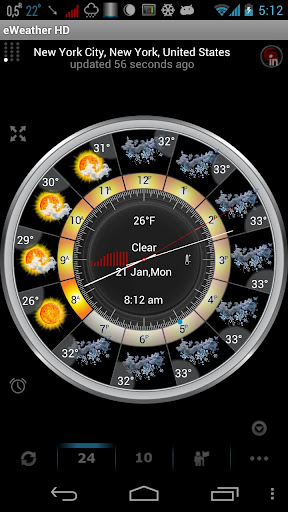
The most unique feature in this application is the “Weather Clock”. It provides all of the previous information in an hour-by-hour clock format and is very interactive, informative and fun to use. Check it out!
eWeather HD is recommended for those who are interested in weather, astronomy, aviation, hunting, fishing, travel, own or work on a farm or ranch, a private or vacation home, or work or play in a weather-sensitive environment or industry… the list goes on and on!
What’s in this version:
- Show four day weather forecast in notification area with text color and background color options (eWeather HD->Menu->Options->Status bar notification options).
- Sound on earthquake (eWeather HD->Menu->Options->Earthquake).
- Show weather for today and tomorrow on 4×2 and 2×2 widgets.”
This app has no advertisements
Free eWeather HD Radar HD Alerts v4.7.4 apk
 

Clean Calendar Widget Pro apk v4.11 download

Clean Calendar Widget Pro v4.11
Requirements: Varies with device
Overview: A clean and easy to use Calendar/Agenda Widget to show and to edit your events.
\"\"
It synchronizes with the default calendar and provides following key features:
– 6 different widget sizes (4×1, 4×2, 4х3, 4×4 and 6×2, 6×4 designed for tablets), more are coming
– Smooth events scrolling
– Pick calendars to show events from
– Enter new events and open your calendar from the widget
– Fold / unfold the buttons panel to provide more space for the events
– Highlight today events
– Filter out all-day events
– Show day of the week in event date
– The ability to change the text color
– Make background transparent (may require widget reset)
– Show the week numbers
– Change font size
– Group events by date
What’s in this version:
* Only Android 3.2+ devices will be updated for now, the update for older versions is under development!
4.11
– Further small interface improvements
– BUGFIX: False events appeared in the "Today" group
– BUGFIX: Events order while "fix all day events" is on
Have an Idea for a new feature? Please let me know 
This app has no advertisements
More Info:
Code:
 

One More Clock Widget apk v1.4.1 download

One More Clock Widget v1.4.1
Requirements: Android 1.6 and up
Overview: Spruce up your homescreen with 60+ fun, expressive clock widgets!
60+ dynamic clock widgets for your homescreen, ad free.
The full version of OMC supports 8 widget sizes:
4×4, 4×2, 4×1, 3×3, 3×1, 2×2, 2×1 and 1×3.
email skwong@consultant.com for support and suggestions!
– Ice Cream Sandwich Lockscreen Clock
– Halloween Clock (Morbid Moments in Full Collection)
– Honeycomb Look (as featured on XDA-Developers!)
– Clock Too (our impression of QlockTwo)
– Chi, Soar & Konsentriko
– Generic Elegance
– C. Bizon’s Freddie
– Lucas’s X-a Clock
– Zehro’s Conky Clock
– Kimbo’s MLT
– Nixie Notions
– Comic balloons
– Variations of several popular minimalist clocks (Typo, Simi, etc)
… and much more!
Can be set to launch any app via widget click.
All widgets editable on the phone and via JSON.
Tested to work with WidgetLocker.
What’s in this version:
10 new clocks.
Weather fixes.
Stability fixes.
Widget backup and restore.
Improved clock rendering.
Misc. bugfixes.
This app has NO advertisements
More Info:
Code:
 

Wednesday, 16 January 2013

Clean Widgets apk v3.05 download

Clean Widgets v3.05
Requirements: 2.1 and up
Overview: Clean Widgets is a collection of home screen widgets for Android phones and tablets.
It contains two clocks, two battery meters, and toggles for 8 different settings (Airplane mode, auto-sync, auto-rotate, Bluetooth, brightness, flashlight, vibrate mode, and WiFi). All of the widgets have customizable colors and backgrounds, and many have other options that can be changed.
To use Clean Widgets once you’ve bought them:
On Gingerbread and below, touch-and-hold on your homescreen and select "Widgets". Find the widget you’d like and touch to select it.
On Honeycomb/Ice Cream Sandwich and above, open the app drawer and press the "Widgets" button. Find the widget you’d like, touch-and-hold, and drag the widget to where you’d like it on your homescreen.
Clean Widgets is updated often, and if you already own Clean Widgets these updates are free of charge. Please take the time to rate and review, your input is read and valued!
What’s in this version:
3.0
Full graphical overhaul
Added selectable backgrounds
Added new color choices
Added live configuration screens
Added alarm view on the large clock
Allowed widgets to be resized (Android 3.1 and above)
Bug fixes
Significant filesize decrease
3.01
Fixed minor bug causing clock widget to crash in Android 4.1
3.05
Minor clock layout adjustments
This app has no advertisements
More Info:
Code:
 

FlashLight HD LED Pro apk v1.44 download

FlashLight HD LED Pro v1.44
Requirements: Android 2.1 and up
Overview: Use your Android device as a torch with this beautiful app !
– It is simple and well designed
– launch it and get light instantly by pressing one button
– uses the integrated FlashLight
– also uses your full screen as a light source (works on all devices)
– add a widget for quick access
Try it. It’s simply the best at what it does.
Recent changes:
– Removed Mobclix ad network (and permissions);
– Fixes issues with Android 4.0 (ICS) phones and Droid 4;
– better interface on tablets (Xoom, Kindle Fire, Galaxy Tab);
– modify brightness when using the screen;
– Recent compatibility fixes : Motorola Cliq, Atrix 2 + Spyder, Milestone 2, Sony Xperia X10i, Asus Transformer Prime, Samsung SCH-R880, SCH-I500 (Fascinate, Mesmerize), Galaxy TAB P7500, Huawei UM840, ‘Unknown’ phones, LG Marquee, Nexus S, CASIO – C771, LG Optimus Black, Motorola Droid.
What’s in this version:
– Respects silent mode
– Root mode fixes
– Various compatibility and stability fixes
This app has NO advertisements
More Info:
Code: